Use Cases 5 min read
One Meeting Assistant, Five Teams: How Each Team Uses Acta
The same meeting means different things to sales, HR, support, engineering and leadership. Here is how each team uses Acta, the questions they ask and what they get back.
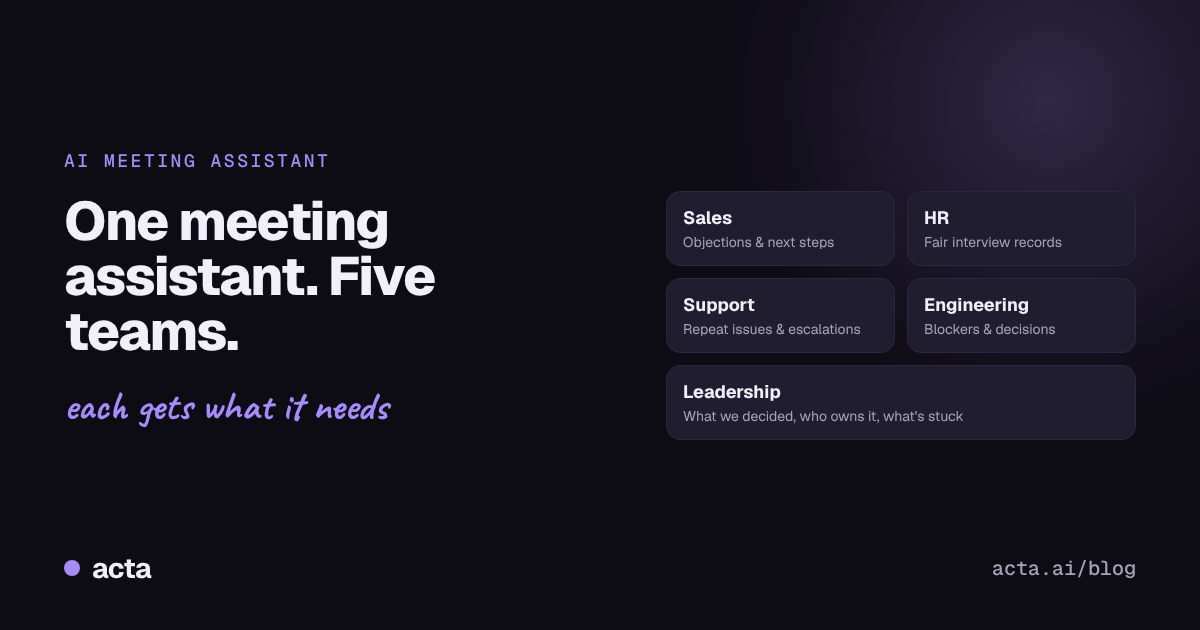
Quick answer: An AI meeting assistant records, transcribes and summarises your calls, but each team needs something different from the same meeting. Sales wants objections and next steps, HR wants a fair interview record, support wants issues and escalations, engineering wants blockers and decisions, and leadership wants to know what was decided and who owns it. Acta is built around these roles.
A sales call and a sprint retro are both "meetings," but that's where the similarity ends. The sales rep cares about what the customer objected to and what happens next. The engineering lead cares about the blocker that came up for the third week in a row. Give them both the same generic summary and neither is happy.
That's why we built Acta around roles. Here's how five different teams use it, with the questions they ask and what they get back.
What does every team get from Acta?
Before the team-specific part, here's what Acta does for everyone:
- Joins Zoom, Google Meet and Microsoft Teams with a meeting bot, or records through the desktop app or Chrome extension. You can also upload existing recordings.
- Transcribes with speaker names.
- Summarises each meeting with key points.
- Pulls out decisions and action items with owners and due dates.
- OneChat answers questions across all your meetings and the files you upload, with sources.
- Works from Claude through Acta's connector, so you can ask about meetings without switching apps.
Now, the differences.
How do sales teams use an AI meeting assistant?
The problem: reps spend the hour after a call writing notes, updating the CRM and drafting follow-up emails. Details get lost, and managers only hear the rep's version of the call.
How sales teams use Acta:
- Every call gets a summary with the customer's needs, objections, competitors mentioned and agreed next steps.
- Action items like "send pricing by Friday" are captured with an owner and date, so follow-ups don't slip.
- Before a renewal or second call, reps ask OneChat: "Summarise everything we've discussed with Acme this quarter."
- Managers ask: "What objections came up most in September's calls?" That answer is better sales training than any slide deck.
Why it matters: the rep stays focused on the conversation instead of typing, and nothing promised to a customer gets forgotten.
How do HR and hiring teams keep interviews fair and consistent?
The problem: interviewers take uneven notes, memories fade between rounds, and hiring decisions end up resting on whoever spoke last in the debrief.
How HR and hiring teams use Acta:
- Interviews are transcribed, so the record reflects what the candidate actually said.
- Summaries highlight experience, examples given and questions asked.
- Before a debrief, the panel asks: "What did the candidate say about their notice period and salary expectations?" and gets the answer with a link to its source.
- Action items like "Nisha schedules the final round" don't depend on anyone's memory.
Why it matters: decisions rest on the conversation, not on recollection, and candidates get a fairer process. Always tell candidates the interview is being recorded.
How do customer support and success teams spot problems early?
The problem: important customer issues surface in calls but never reach product or leadership, because they live in one agent's head.
How support and success teams use Acta:
- Call summaries flag the issue, the customer's mood and what was promised.
- Escalations and follow-ups are captured as action items with owners.
- Team leads ask OneChat: "Which issues came up in more than one customer call this month?"
- Uploaded help articles and policy documents let OneChat check whether what was promised matches what's written.
Why it matters: recurring problems show up as patterns instead of anecdotes, and promises to customers get kept.
How do engineering and Scrum teams track blockers and decisions?
The problem: standups and retros produce the same blockers week after week, decisions get made verbally and then forgotten, and nobody can remember why something was built a certain way.
How engineering teams use Acta:
- Standups produce a short list of updates, blockers and owners.
- Decisions like "check with Arjun before any production push" go into the decision log, linked to the conversation.
- Scrum masters ask: "Which blockers came up in more than one standup this sprint?"
- New engineers ask: "Why did we choose this approach for the recording server?" and get the original discussion.
Why it matters: recurring blockers get fixed instead of repeated, and the reasoning behind technical choices isn't lost when people move on. We cover this in depth in how to track decisions made in meetings.
How do founders and leaders keep track of what was decided?
The problem: leadership sits in back-to-back meetings with investors, partners, customers and teams. By Friday, it's hard to say what was agreed in any of them.
How leaders use Acta:
- The decision log shows decisions across teams, who owns them and whether they're still active, changed or reversed.
- On Monday morning, ask OneChat: "What did we decide last week, and what's still open?"
- Before an investor or board meeting, ask: "What did we commit to in the last investor update?"
- Overdue action items across the company are visible in one place.
Why it matters: leaders spend less time asking for status updates and more time unblocking the things that are stuck.
How do you choose the right setup for your team?

A simple way to start: pick one recurring meeting per team, run Acta on it for two weeks, and ask that team's question from the table at the end of week two.
Frequently asked questions
What is an AI meeting assistant?
It's a tool that joins or records your meetings, transcribes them, and produces summaries, decisions and action items. Some, like Acta, also let you ask questions across all your past meetings.
Can one AI meeting assistant work for sales, HR and engineering?
Yes, if it understands the different roles. Acta is designed around role-based use, so the same meeting can produce sales next steps, interview notes or sprint blockers depending on who's using it.
Does Acta work with Zoom, Google Meet and Microsoft Teams?
Yes. Acta can join meetings on all three, record through its desktop app or Chrome extension, or work from recordings you upload.
Is it legal to record interviews and customer calls?
Rules vary by country and situation. In most cases you should tell participants the meeting is being recorded and get their consent, so check the rules that apply to you.
How do teams find information from past meetings?
With Acta's OneChat, you ask a question in plain language and get an answer from your meetings and uploaded files, with links to where each fact came from.
Pick one meeting and try it: start free with Acta.