Guides & How-tos 9 min read
How to Build Text Classification and Zero-Shot Classification With Open Models
A practical guide to text classification and zero-shot classification: which open models to start from, zero-shot, SetFit and Trainer code, serving and evaluation.
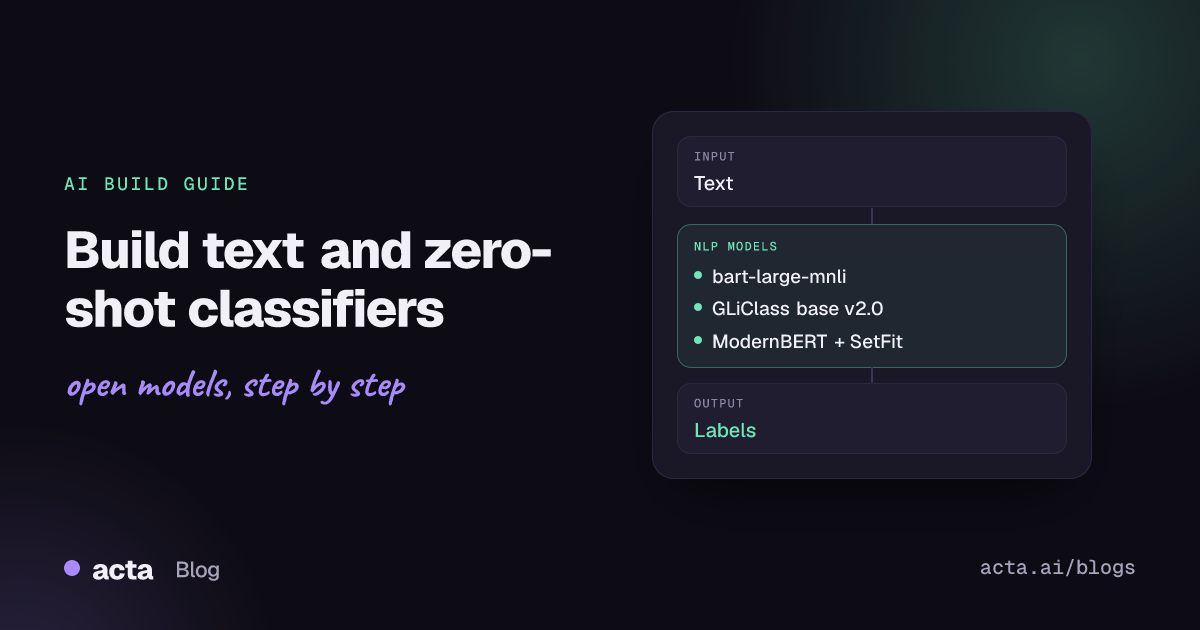
Quick answer: Text classification assigns one or more labels to a piece of text, such as sentiment, topic, intent or urgency. Zero-shot classification does the same with labels you choose at request time and no training data. The shortest path: prototype with a zero-shot model such as bart-large-mnli in the transformers pipeline, then fine-tune a small encoder with SetFit or the Trainer API once you have labelled examples.
Classification is one of the most common NLP jobs in production. Support teams route tickets with it, trust and safety teams flag abusive posts, product teams track sentiment in reviews, and security teams screen prompts before they reach an LLM. The models are small, cheap to run on a CPU, and easy to measure, which makes them a good first AI feature for many products.
This guide covers both Hugging Face tasks in this space: supervised text classification, where a model is trained on a fixed label set, and zero-shot classification, where you pass candidate labels at inference time. It shows which open models to start from, working code, how to deploy and how to evaluate.
What is text classification and zero-shot classification?
The Hugging Face text classification task page describes the task as assigning a label or class to a given text. The input is a string (or a pair of strings, for tasks such as natural language inference or paraphrase detection). The output is a list of labels with scores. Typical variants are sentiment analysis, topic labelling, language identification, spam and toxicity detection, and NLI.
Most supervised classifiers are encoder models (BERT, RoBERTa, DeBERTa, ModernBERT) with a small classification head on top of the pooled output. You fine-tune the whole network on labelled examples, and the head learns a fixed set of classes. Change the label set and you retrain.
The zero-shot classification task page covers the other approach: predicting classes the model never saw during training. The common technique reuses an NLI model. For each candidate label the pipeline builds a hypothesis such as "This example is about billing." and asks the model whether the input text entails it. The entailment scores become label scores. A Hugging Face forum thread on zero-shot classification explains this NLI framing in more detail. Newer zero-shot architectures such as GLiClass score all labels in one forward pass instead of one pass per label, which matters when you have dozens of labels.
What can you build with it?
- Support ticket routing. Classify incoming tickets by product area and urgency, then send them to the right queue.
- Review and survey analysis. Tag feedback by sentiment and topic so a dashboard can show what customers complain about this week.
- Content moderation. Flag spam, abuse or off-topic posts for human review.
- Prompt screening. Run a small classifier in front of an LLM to catch prompt injection and jailbreak attempts.
- Language detection before translation or before choosing a language-specific model downstream.
- Meeting and document tagging. Label transcript segments as decision, action item, risk or small talk so later search and summaries can focus on what matters.
Which models should you use?
Start from a model that already matches your label type if one exists; otherwise start zero-shot and move to a fine-tuned encoder. Check each model card for its licence and intended use before shipping.
- distilbert/distilbert-base-uncased-finetuned-sst-2-english: a small general-purpose English sentiment model (positive or negative) and the default widget model on the task page. Runs well on CPU.
- cardiffnlp/twitter-roberta-base-sentiment-latest: RoBERTa-base sentiment model trained for tweets and other short social text. ProsusAI/finbert is the equivalent for financial text.
- papluca/xlm-roberta-base-language-detection: XLM-RoBERTa-base model that identifies the language of a text.
- meta-llama/Prompt-Guard-86M: an 86M-parameter classifier for detecting prompt attacks against LLM applications. Read its licence terms on the card first.
- facebook/bart-large-mnli: the classic NLI-based zero-shot classifier and the widget model for the zero-shot task. A reliable English baseline, but it runs one forward pass per label.
- MoritzLaurer/ModernBERT-large-zeroshot-v2.0: a zero-shot classifier from the zeroshot-v2.0 series, built on ModernBERT-large and recommended in the Hugging Face Inference Providers docs.
- knowledgator/gliclass-base-v2.0-rac-init: a GLiClass model that scores many labels in one pass and supports multi-label output. The GLiClass repository (Apache-2.0 code) lists other sizes, and the GLiClass sandbox Space lets you try them in a browser.
- ModernBERT base and large: not a classifier out of the box, but a strong modern encoder to fine-tune when you have your own labelled data. See the ModernBERT paper.
There is no single leaderboard for every classification task, because label sets differ by domain. The classification tasks in the MTEB leaderboard are useful for comparing embedding backbones if you plan to train with SetFit or a linear head. The zero-shot classification docs show current recommended models for hosted inference.
How do you build it, step by step?
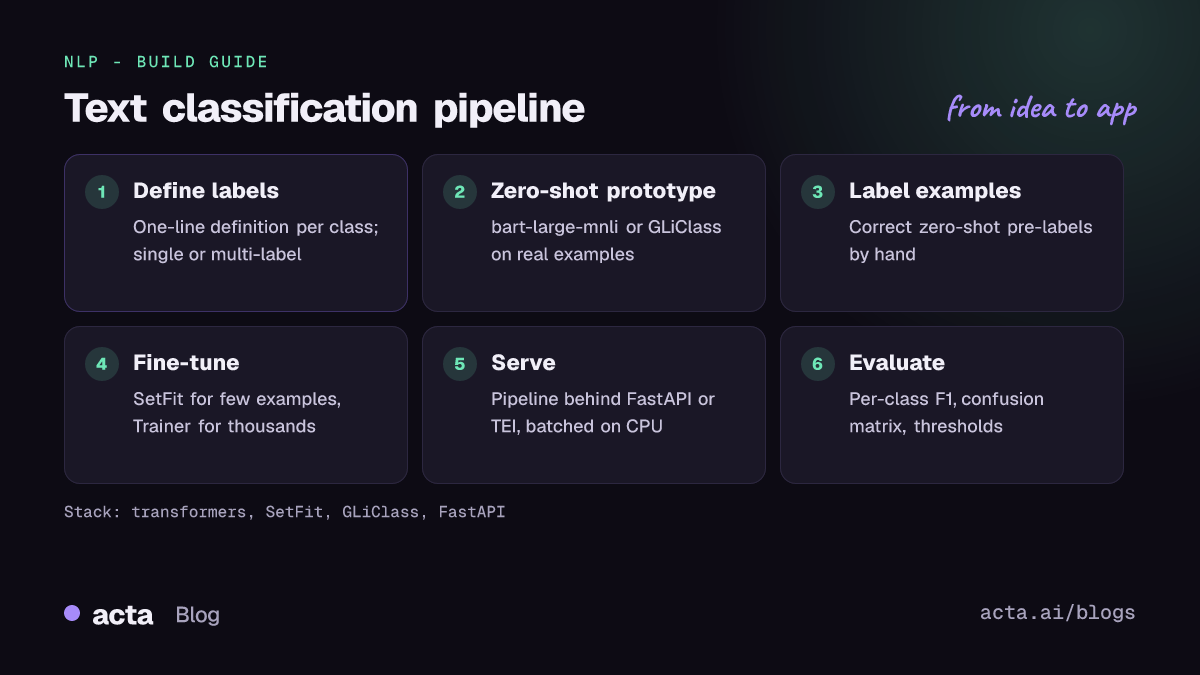
- Define the labels. Write a one-line definition for each class and decide whether a text can have several labels (multi-label) or exactly one. Vague or overlapping labels hurt every model.
- Prototype zero-shot. Run a zero-shot model on 100-200 real examples with your label names. Tune label wording and the hypothesis template; this often moves accuracy more than changing the model.
- Collect and label examples. Use the zero-shot predictions as pre-labels and correct them by hand. Aim for at least 8-16 examples per class to start, more for confusing classes.
- Fine-tune. With few examples, train with SetFit on a sentence-transformers backbone. With thousands, fine-tune an encoder such as DistilBERT or ModernBERT with the transformers Trainer.
- Serve it. Wrap the model in a pipeline behind an HTTP endpoint, batch requests, and log inputs and predictions (with appropriate privacy controls).
- Evaluate and iterate. Measure per-class precision, recall and F1 on a held-out set, review the confusion matrix, and add examples for the classes that get mixed up.
Zero-shot first. This follows the transformers pipeline example on the task page; the hypothesis_template and multi_label arguments are documented in the pipeline's docstring (default template: "This example is {}."):
from transformers import pipeline

# Follows the zero-shot example in the Hugging Face task docs (huggingface.js about.md)
classifier = pipeline("zero-shot-classification", model="facebook/bart-large-mnli")

ticket = "I was charged twice for my subscription this month and need a refund."
labels = ["billing", "bug report", "feature request", "account access"]

result = classifier(
    ticket,
    candidate_labels=labels,
    hypothesis_template="This support ticket is about {}.",
    multi_label=False,
)
print(result["labels"][0], round(result["scores"][0], 3))
Set multi_label=True when several labels can apply at once; each label is then scored independently instead of the scores summing to one.
Few-shot next. SetFit fine-tunes a Sentence Transformer contrastively on a handful of examples and then trains a classification head, with no prompts. The snippet below is shortened from the README example (see the SetFit docs and the SetFit paper):
from datasets import load_dataset
from setfit import SetFitModel, Trainer, TrainingArguments, sample_dataset

# Follows the SetFit README: 8 labelled examples per class
dataset = load_dataset("stanfordnlp/sst2")
train_dataset = sample_dataset(dataset["train"], label_column="label", num_samples=8)
eval_dataset = dataset["validation"].select(range(100))

model = SetFitModel.from_pretrained(
    "sentence-transformers/paraphrase-mpnet-base-v2",
    labels=["negative", "positive"],
)
args = TrainingArguments(batch_size=16, num_epochs=4)
trainer = Trainer(
    model=model,
    args=args,
    train_dataset=train_dataset,
    eval_dataset=eval_dataset,
    metric="accuracy",
    column_mapping={"sentence": "text", "label": "label"},
)
trainer.train()
print(trainer.evaluate())
print(model.predict(["i loved the spiderman movie!"]))
Full fine-tuning once you have more data. This is condensed from the transformers sequence classification guide, which fine-tunes distilbert/distilbert-base-uncased on IMDb:
from datasets import load_dataset
from transformers import (AutoTokenizer, AutoModelForSequenceClassification,
                          DataCollatorWithPadding, TrainingArguments, Trainer)

# Condensed from the transformers sequence classification task guide
imdb = load_dataset("stanfordnlp/imdb")
tokenizer = AutoTokenizer.from_pretrained("distilbert/distilbert-base-uncased")
tokenized = imdb.map(lambda b: tokenizer(b["text"], truncation=True), batched=True)

id2label = {0: "NEGATIVE", 1: "POSITIVE"}
label2id = {"NEGATIVE": 0, "POSITIVE": 1}
model = AutoModelForSequenceClassification.from_pretrained(
    "distilbert/distilbert-base-uncased", num_labels=2,
    id2label=id2label, label2id=label2id)

args = TrainingArguments(output_dir="my_classifier", learning_rate=2e-5,
                         per_device_train_batch_size=16, num_train_epochs=2,
                         weight_decay=0.01, eval_strategy="epoch",
                         save_strategy="epoch", load_best_model_at_end=True)
trainer = Trainer(model=model, args=args,
                  train_dataset=tokenized["train"], eval_dataset=tokenized["test"],
                  processing_class=tokenizer,
                  data_collator=DataCollatorWithPadding(tokenizer=tokenizer))
trainer.train()
The guide also adds an accuracy metric through compute_metrics. For more complete training scripts, see the transformers text-classification examples.
How do you serve and deploy it?
Encoder classifiers are small, so the options are simple:
- CPU first. DistilBERT- and base-sized models answer short texts quickly on a CPU. Batch requests and cap the input length with truncation to keep latency stable.
- Export for speed. Convert to ONNX or use dynamic quantization when you need more throughput per core. Recheck accuracy after any conversion.
- A dedicated server. Text Embeddings Inference also serves sequence classification and reranking models behind an HTTP API on CPU or GPU, which saves you writing your own batching layer.
- A thin API. For most teams, a FastAPI endpoint that loads one pipeline at start-up is enough. Add a Gradio front end if labellers or stakeholders need to try the model.
- Zero-shot cost. NLI-based zero-shot runs one forward pass per candidate label, so cost grows with the label count. If you have many labels, use GLiClass, or move to a fine-tuned model once you have data.
Keep the label mapping (id2label) in the model config so the API returns readable labels, and version the model together with the label definitions.
How do you evaluate it?
- Accuracy is fine for balanced, single-label problems.
- Precision, recall and F1 per class matter when classes are imbalanced, which is the usual case for moderation and routing. Report macro-F1 so small classes count.
- Confusion matrix to see which pairs of labels the model mixes up; often the fix is a clearer label definition.
- Threshold tuning. For multi-label and safety use cases, pick a score threshold per class on a validation set based on the cost of false positives and false negatives.
- Calibration and drift. Re-check performance on recent data every few weeks; topics and wording change.
Public benchmarks such as GLUE are useful for comparing backbones, but only a test set drawn from your own traffic tells you whether the classifier works for your product.
Pitfalls and tips
- Label wording matters in zero-shot. "refund request" and "billing" can give very different scores. Test several phrasings.
- Language coverage. Many popular classifiers are English-only. For multilingual input, use a multilingual backbone or detect the language first.
- Domain shift. A model trained on movie reviews will misread support tickets. Fine-tune on your own data when accuracy matters.
- Licences. Licences differ between models and between code and weights. Check each model card before commercial use.
- Privacy. Classifiers often run on customer messages. Self-host when the text is sensitive, and avoid logging raw text without a retention policy.
- Use an LLM only when needed. A general LLM can classify with a prompt, but a fine-tuned encoder is usually faster, cheaper and easier to evaluate for a fixed label set. See our text generation guide if you need open-ended output instead.
Where to get help
- The Hugging Face forum has many threads on zero-shot and fine-tuning questions.
- The issue trackers of huggingface/setfit and Knowledgator/GLiClass for library-specific problems.
- The MTEB leaderboard for comparing embedding backbones on classification tasks.
Frequently asked questions
When should I use zero-shot instead of a fine-tuned classifier?
Use zero-shot when you have no labelled data, when labels change often, or to bootstrap a dataset. Switch to a fine-tuned model when the label set is stable and you need higher accuracy or lower cost per request.
How many labelled examples do I need?
SetFit is designed for very small datasets; its README shows a sentiment model trained on 8 examples per class. Full fine-tuning of an encoder usually benefits from hundreds or thousands of examples per class.
Can one text have several labels?
Yes. Use multi_label=True in the zero-shot pipeline, a multi-label GLiClass pipeline, or train a model with a multi-label problem type and a per-class threshold.
Do I need a GPU?
Not for inference with base-sized encoders on short texts. A GPU helps for fine-tuning, for large zero-shot models with many labels, and for high request volumes.
Classification often pairs with entity extraction and search: see our guides to named entity recognition and semantic search with embeddings.