Record every meeting.
No bot joins.
Acta for Windows and Mac records Zoom, Microsoft Teams or any call from your own computer. It opens by itself when a Zoom or Teams meeting starts, and turns the meeting into a transcript with speaker names, a summary and action items.
Free 15-day trial · Windows 10 or 11 · macOS 14.2+ · Intel Mac? Download here
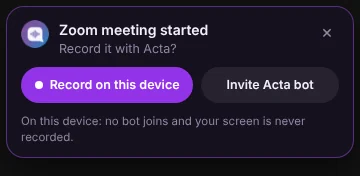
- No “Notetaker has joined”
- Works with any calling app
- Your screen is never recorded
- Mac app notarized by Apple
How the Acta desktop app works
Set it up once. Every meeting after that is captured for you.
- 01
Install and sign in
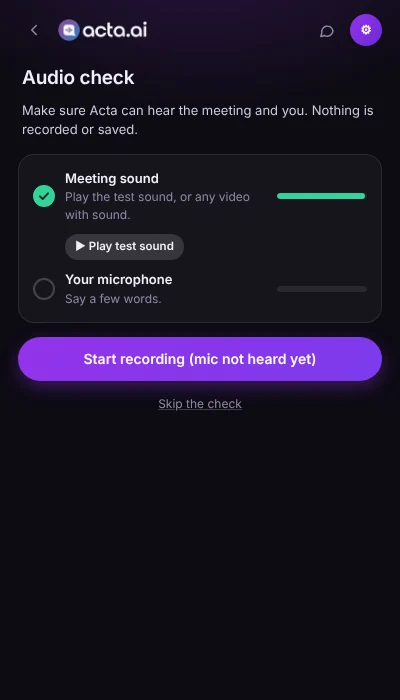
Download Acta for Windows or Mac and sign in with your Acta account. A one-time audio check confirms it hears the meeting and your microphone.
- 02
Start your meeting
When a Zoom or Teams meeting starts, Acta opens and asks, or records automatically with the recording panel on screen. For any other app, press Start recording.
- 03
Get your notes
When the meeting ends, Acta saves it. The transcript with speaker names, summary and action items appear in Acta minutes later.
See the app
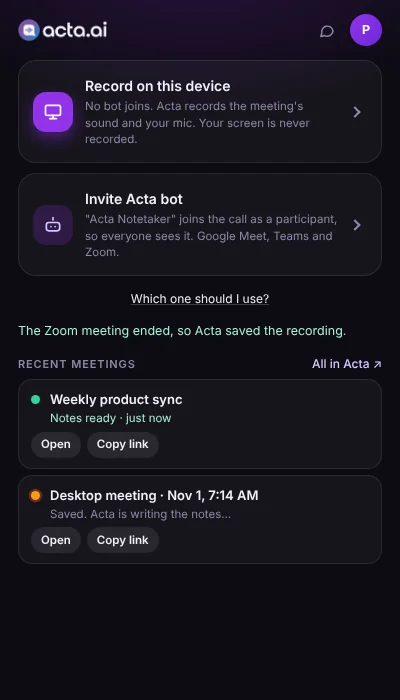
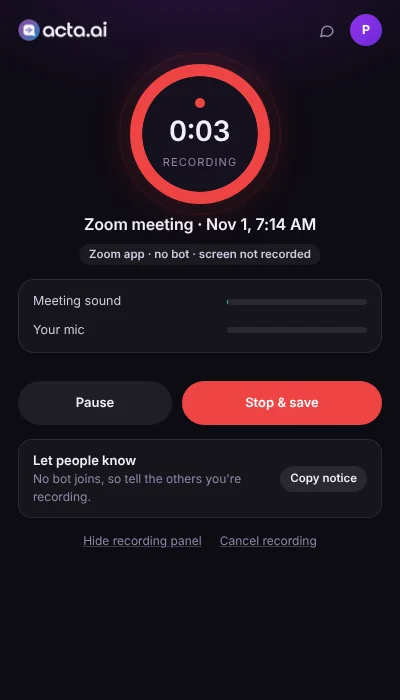
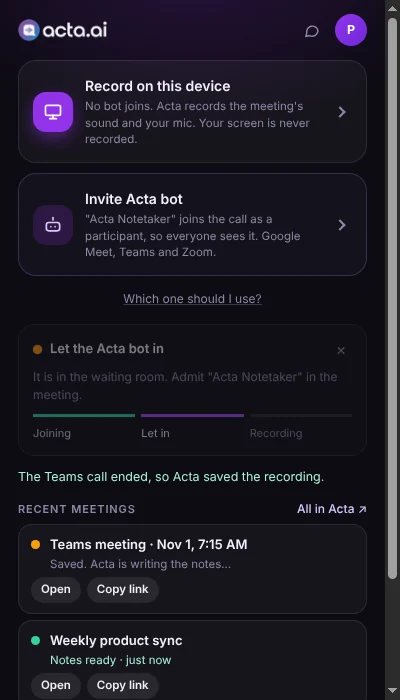
The Acta desktop app on Windows and Mac.

What the desktop app does
Built for the Zoom and Teams desktop apps, where browser tools can't reach.
Detects Zoom and Teams meetings
Acta notices a meeting in the Zoom or Microsoft Teams desktop app (including Teams free) and opens by itself.
Records any calling app
Acta records the sound you hear and your microphone, so it works with Webex, Slack huddles, WhatsApp, Google Meet in a browser and more.
A small recording panel
A timer with Pause, Resume and Stop & save stays on top of your meeting. Hide it any time.
Or send the Acta bot
Copy the meeting link and Acta fills it in. See the bot's status live, and Acta never records the same meeting twice.
Named after your meeting
Recordings take the meeting's name from the Teams window or your calendar, so your meetings are easy to find.
Speaker names
Your voice is marked as you. The other voices are named from the conversation and your calendar invite.
Calendar reminders
A minute before a calendar meeting, Acta offers to record it on your computer or send the bot.
Nothing is lost offline
Recordings are kept on your computer and upload by themselves when you are back online.
Private by design
Your screen is never recorded. Recordings go straight to your Acta account and are shared only if you share them.
Record on your computer or send the bot
Both are in the app. Choose for each meeting.
| Record on this device | Acta bot | |
|---|---|---|
| Who sees it | No one joins the call | “Acta Notetaker” joins as a participant |
| Works with | Any calling app on your computer | Google Meet, Microsoft Teams and Zoom links |
| Speaker names | You, plus names from the conversation and calendar | From the meeting's participant list (most exact) |
| Video | Sound only, never your screen | The meeting's video |
| Needs | Your computer on during the call | The host to let the bot in |
System requirements
Windows
- Windows 10 (version 1903 or later) or Windows 11
- Detects meetings in the Zoom and Microsoft Teams apps, including Teams free
- Teams meetings are named after the Teams meeting window
- First install: if Windows shows a SmartScreen message, click More info, then Run anyway
Mac
- macOS 14.2 Sonoma or later, Apple chip or Intel
- Signed and notarized by Apple: opens with a normal double-click
- Allow the microphone and “System Audio Recording Only”. Acta never records the screen
- Meetings are named from your calendar
Updates never interrupt a recording: Acta installs them after the meeting.
Desktop app or Chrome extension?
Use one or both. Everything lands in the same Acta account.
Desktop app
Windows & Mac
- Zoom and Microsoft Teams desktop apps, and any calling app
- Opens by itself when a Zoom or Teams meeting starts
- Records automatically if you want
- Works even if your browser is closed
Chrome extension
Any computer with Chrome
- Google Meet, Teams and Zoom in the browser
- Speaker names detected live
- One click to start from the meeting tab
- Nothing to install beyond Chrome
Frequently asked questions
Can't find what you need? Read the guide or contact us.
What is the Acta desktop app?
Acta for desktop is a free-to-try meeting recorder for Windows and Mac. It records your meetings from your own computer, with no bot joining the call, and Acta turns each meeting into a transcript with speaker names, a summary and action items.
Will other people in the meeting see a bot?
No. With Record on this device, Acta records from your computer, so no extra participant joins. If you want the bot instead, choose Invite Acta bot and “Acta Notetaker” joins the call.
Can I record a Zoom meeting without a bot?
Yes. Join your Zoom meeting in the Zoom app as usual. Acta detects it and asks to record, or records automatically if you turn that on. It stops and saves when the meeting ends. It works the same way for Microsoft Teams.
Which meeting apps does it work with?
Acta detects meetings in the Zoom and Microsoft Teams desktop apps by itself. Record on this device also works with any other calling app, such as Webex, Slack huddles, WhatsApp or Google Meet in a browser: open Acta and press Start recording.
Does it record my screen?
No. Acta records only the meeting's sound and your microphone. Your screen is never recorded.
Does it record all my meetings automatically?
Only if you turn on “Record detected meetings automatically”. Otherwise Acta asks each time a Zoom or Teams meeting starts, and you can record, send the bot or dismiss.
What do I need to run it?
Windows 10 (version 1903 or later) or Windows 11, or macOS 14.2 Sonoma or later, Apple chip or Intel, and an Acta account.
Is the Mac app safe to install?
Yes. The Mac app is signed by Agilean Solutions, the company behind Acta, and notarized by Apple, so it opens with a normal double-click. The first time, macOS asks you to allow the microphone and “System Audio Recording Only”.
Why does Windows show “Windows protected your PC”?
Windows shows this for new apps it doesn't know yet. Click More info, then Run anyway to install Acta. The message goes away for everyone once the Windows app is code-signed.
Where do my recordings go?
Straight to your Acta account. The summary, action items and transcript appear a few minutes after the meeting, and the desktop app shows “Notes ready” with a link to open them.
How much does it cost?
The desktop app is included in your Acta plan, with a free 15-day trial.